Frequently asked questions
Why doesn't rekordbox Auto Gain work on CDJs?
rekordbox Auto Gain is a volume value set for each track when rekordbox analyses it. rekordbox saves it in its own library and applies it on its own decks and mixer, in PERFORMANCE mode and in the DUAL PLAYER layout of EXPORT mode. It is never written into the audio file, so a CDJ reading a USB stick never sees it and plays the file as it is. Bake'n Deck's headroom tool writes the gain into the audio file itself, so the level survives the export. The full guide.
Where is the Auto Gain setting in rekordbox?
Preferences > Controller > Mixer > Auto Gain. Set it to Enable and rekordbox adjusts the volume of the track loaded on a deck (rekordbox 7.2.18 Instruction Manual, p. 242). Each track's value is shown, and can be changed by hand, with the Auto Gain knob in the GRID EDIT panel (p. 140), and the DUAL PLAYER layout of EXPORT mode has an AUTO GAIN control too (p. 122). Turn it off to hear the level that is actually in the file, which is the level a CDJ plays. The full guide.
What level does rekordbox Auto Gain aim for?
rekordbox does not document it. Measured on six tracks on 2026-10-02, each Auto Gain value equals about -10 LUFS minus the track's integrated loudness, to within 0.1 dB. So it evens out loudness at playback, raising tracks as well as lowering them. The full guide.
Is it possible to sort by Key AND BPM in rekordbox?
Not in one step in rekordbox itself: it sorts by key or by BPM, one column at a time, and its Renumber Track Order stores only such a one-column order in the playlist, which is the order CDJs play. By hand, key then BPM takes two sorts and two renumbers per playlist. Bake'n Deck's Sort (baken rbsort) rewrites the track order inside every playlist of your exported collection XML so each runs Alphanumeric key 1A to 12B with ascending BPM inside each key. Point rekordbox's Imported Library at that file once and the rekordbox xml tree becomes a sorted mirror of your Playlists. Drag a playlist over, export to USB, and the CDJ plays it in that order. The Mac app previews the resulting order before writing and offers a one-click re-sort whenever rekordbox exports again. The full guide.
Can I write a USB stick for CDJs without opening rekordbox?
Yes. A player reads a stick through a handful of files: the Device Library (export.pdb), a set of analysis files for each track, the audio and your My Settings. rekordbox normally writes them when you export in EXPORT mode. baken expressport, part of the free baken command line, writes the same files straight from the collection.xml rekordbox exports, and the USB Export page in Bake'n Deck for Mac runs the same code in a window. Your prep stays in rekordbox: analysis, beat grids, cues and playlists are made there as always, and only the last step, writing the stick, happens elsewhere. The full guide.
Why does rekordbox 7 say it found a library inconsistency on my stick?
Because the stick carries rekordbox 7's two libraries, the Device Library and OneLibrary, and they no longer list the same playlists, usually because something rewrote one and left the other. If the stick belongs to rekordbox, export again from rekordbox, or format the stick and export from scratch. On a baken stick, run the export again with baken 4.4.0 or later or Bake'n Deck for Mac 1.2.0, which removes the stale OneLibrary files, or delete exportLibrary.db, its -wal and -shm files and exportExt.pdb by hand. The full guide.
Why won't my FLAC or ALAC tracks play on an older CDJ?
Pre-NXS2 CDJs (CDJ-2000NXS, CDJ-2000, CDJ-900NXS, CDJ-850 and similar) only play MP3 reliably. FLAC needs NXS2 hardware (2016 or later), and ALAC, AIFF, WAV and AAC fail on specific firmwares, sometimes mid-set. rekordbox exports these formats to USB without warning. Bake'n Deck's CDJ Safe (baken cdjsafe) builds an MP3-only emergency stick from any playlist with cues and beatgrids carried over.
How do I convert a rekordbox playlist to CDJ-safe MP3s without losing my cues and beatgrids?
Run baken cdjsafe collection.xml --playlist 'Sets/Friday' --out-dir <dir>, or, in the Mac app, turn on CDJ Safe in USB Export, which writes the MP3s straight to the stick with rekordbox's analysis. With cdjsafe, every track becomes 320 kbps CBR MP3 @ 44.1 kHz (ID3v2.3, artwork kept); sources already at that profile are copied byte-identically; missing files are skipped and listed. The XML gains a 'CDJ-safe (MP3)' folder with a '<playlist>-CDJ-safe' playlist whose tracks inherit the source beatgrid and hot/memory cues verbatim. Load it via Preferences, Advanced, Database, rekordbox xml, right-click, Import to Collection, then export to USB as usual.
Does Bake'n Deck use a limiter or change the dynamics?
No. Headroom applies exactly one gain change per track and nothing else: no limiter, no compression, no EQ. Every track is moved so its true peak sits at the same ceiling, -0.5 dBTP by default. Quiet tracks come up as far as their peaks allow and loud tracks come down. Transients, crest factor and stereo image are exactly what the master carried. This is a true peak ceiling, not loudness matching: a track mastered quiet stays relatively quieter than a loud one, because the only way to change that is a limiter. The full guide.
Does Bake'n Deck affect my rekordbox cue points?
No. Headroom rewrites each file in place at the same path, and rekordbox links cues, hot cues, beatgrids and tags to the path, so they stay attached. Sort and CDJ Safe only read and write the XML you exported, never rekordbox's own database.
Does MP3/AAC re-encoding cause audible quality loss?
MP3 and AAC are adjusted by rewriting the global_gain field, which is truly lossless, in the format's native 1.5 dB steps, up or down. Nothing is ever re-encoded to change gain: a file that would need a move smaller than one step is left exactly as it is. So no lossy generation is added, on any run, however many times you run it.
What audio formats does Bake'n Deck support?
FLAC, AIFF, WAV and Apple Lossless (exact gain, source bit depth kept), MP3 and AAC/M4A (lossless 1.5 dB steps via built-in mp3rgain, up or down; nothing is re-encoded, and a file closer to the ceiling than one step is left alone). Since v3.3.2 an ALAC file in an .m4a container is recognised by codec and handled as lossless. AAC means AAC-LC: since v4.7.0 HE-AAC files are skipped, because global_gain cannot reach their SBR high band.
Is Bake'n Deck a replacement for rekordbox?
No. Bake'n Deck is built for rekordbox, not instead of it. Analysis, beat grids, cues, playlists and the library stay in rekordbox. Bake'n Deck works on the collection XML rekordbox exports, hands results back through rekordbox's own Imported Library, never reads or writes rekordbox's database, and on a USB stick copies rekordbox's own analysis files instead of re-guessing them. It covers only the steps rekordbox leaves out of the trip to the CDJ: gain written into the file, a key then BPM order stored in the playlist, CDJ-safe MP3 for older players, and writing the stick from the XML.
Can I apply headroom gain to a single rekordbox playlist?
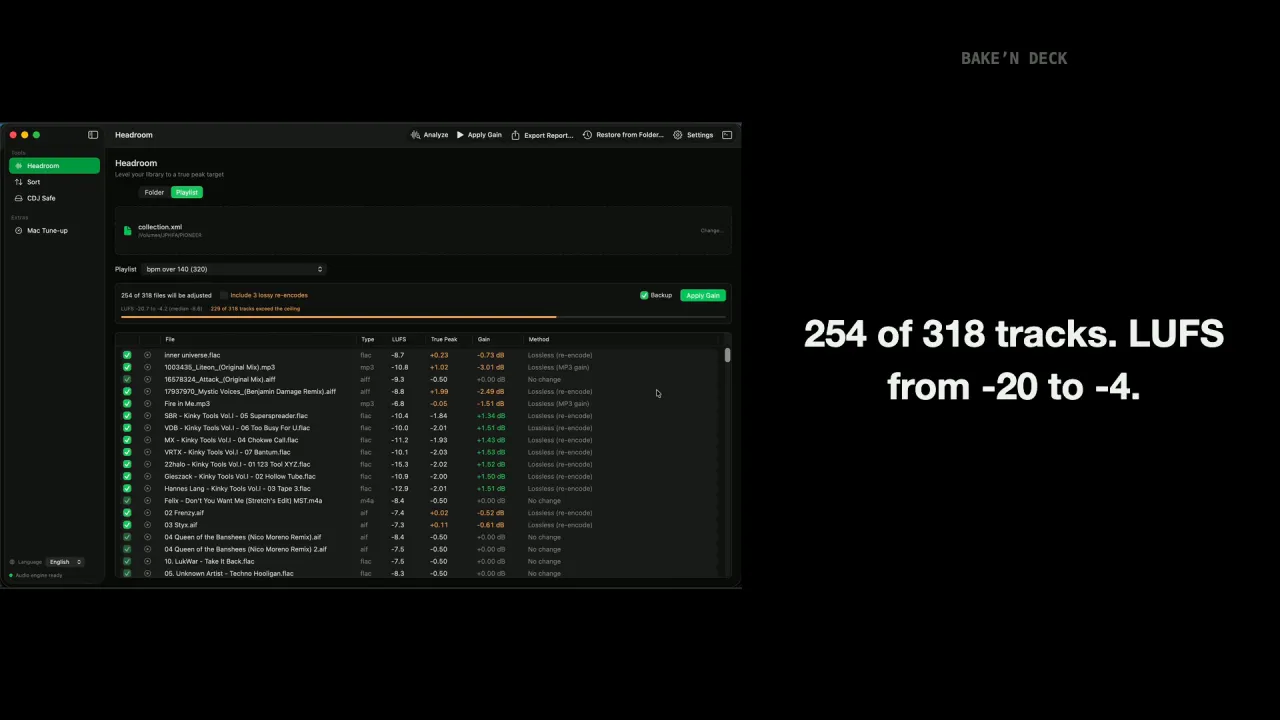
In Bake'n Deck for Mac, yes: Headroom's playlist mode resolves a playlist's tracks from your exported collection XML to the real files, skips unsupported or missing entries with a count, and runs the normal analyze and apply pipeline on just that set. The CLI works on folders, files and globs.
Is there a Mac app, or is Bake'n Deck command line only?
Both. baken is the free, MIT-licensed command-line tool for macOS, Windows and Linux. Bake'n Deck for Mac is a native macOS app on the Mac App Store, built on the same baken-core engine. The Mac app adds Playlist, which takes one rekordbox playlist through Headroom, Sort, and the stick, a per-file analysis cache, remembered folders and collection XML, a review table with audio preview, per-run backups with one-click restore, a sorted-order preview, a one-click re-sort when rekordbox exports the XML again, a check of every track against the player in the booth, on macOS 27 a BPM and key check against rekordbox with energy and vocal tags for the stick, Mac Tune-up, and English and Japanese interfaces. Both editions write the USB stick for the players themselves: USB Export in the app, baken expressport on the command line. It is a one-time purchase with no subscription, no account and no network access.
Will the baken CLI stay free now that the Mac app is out?
Yes. The baken CLI and the baken-core engine are MIT-licensed open source and stay that way. The Mac app is built on the same public crate; its price buys the native interface and the Mac-only workflow features, not the processing.
How do I install Bake'n Deck?
Command line: brew install M-Igashi/tap/baken on macOS, winget install M-Igashi.baken on Windows, yay -S baken-bin on Arch Linux, or cargo install baken. Package managers install ffmpeg automatically. Bake'n Deck for Mac is on the Mac App Store; it bundles its own ffmpeg build, so nothing else is needed.
Does the Mac app send my library anywhere?
No. Bake'n Deck for Mac has no network entitlement at all: no analytics, no crash reporting, no account, no upload. Everything runs on your Mac inside the App Sandbox, touching only the folders you grant. The CLI's only network use is an optional once-a-day release check on GitHub, disabled with --no-update-check.
How does Bake'n Deck handle supply chain security?
Every addition to the build is treated as a risk first. Each new dependency is weighed for what it pulls in: SQLCipher and a vendored OpenSSL were dropped in 4.6.0, and Apple builds use the operating system's own CommonCrypto since 4.6.1. Every pull request runs GitHub's dependency review, which fails on known vulnerabilities of moderate severity or higher, and a licence check against an accepted list. Every GitHub Action is pinned to a full commit SHA, workflows are read-only by default, and secret scanning with push protection, Dependabot security updates and CodeQL are on. crates.io releases use Trusted Publishing, so no crates.io token is stored, and release archives carry SHA-256 checksums.