How to sort a rekordbox playlist by key and BPM
rekordbox cannot sort by key and BPM at the same time. rekordbox and the players sort one column at a time, and rekordbox's Renumber Track Order can store only that one-column order in the playlist, so a key then BPM order cannot be stored in one step. Bake'n Deck's Sort rewrites the track order inside every playlist of your exported collection.xml: Alphanumeric key ascending, BPM ascending inside each key. Because the order lives in the playlist and not in a view, the CDJ plays it in exactly that order in its default browse screen.
Single-column sort vs compound sort
rekordbox and the CDJ-3000 / XDJ-1000MK2 can sort a list by key or BPM, one column at a time. Given the same playlist, the three modes produce different orders:
| Sort mode | Key order | BPM within key group |
|---|---|---|
| Sort by Key (single column) | ✓ aligned | ✗ playlist registration order |
| Sort by BPM (single column) | ✗ scattered across the wheel | ✓ aligned, but key grouping is gone |
| Bake'n Deck Sort (key → BPM) | ✓ aligned | ✓ ascending |
Three sorts, six tracks
Six tracks in a playlist. This is registration order, which is also the order stored in the playlist:
| # | Track | Key | BPM |
|---|---|---|---|
| 1 | A | 1A | 130 |
| 2 | B | 2A | 124 |
| 3 | C | 1A | 124 |
| 4 | D | 2B | 130 |
| 5 | E | 2A | 128 |
| 6 | F | 2B | 124 |
The same six tracks, under each of the three sorts:
| # | Sort by Key | Sort by BPM | Bake'n Deck (key → BPM) |
|---|---|---|---|
| 1 | A · 1A · 130 | C · 1A · 124 | C · 1A · 124 |
| 2 | C · 1A · 124 | B · 2A · 124 | A · 1A · 130 |
| 3 | B · 2A · 124 | F · 2B · 124 | B · 2A · 124 |
| 4 | E · 2A · 128 | E · 2A · 128 | E · 2A · 128 |
| 5 | D · 2B · 130 | A · 1A · 130 | F · 2B · 124 |
| 6 | F · 2B · 124 | D · 2B · 130 | D · 2B · 130 |
Sort by key and the BPM inside 1A and 2B runs 130 → 124, the opposite direction of a warm-up. Sort by BPM and the key walks 1A → 2A → 2B → 2A → 1A → 2B. Only the third column keeps the keys in order and the BPM rising inside each one.
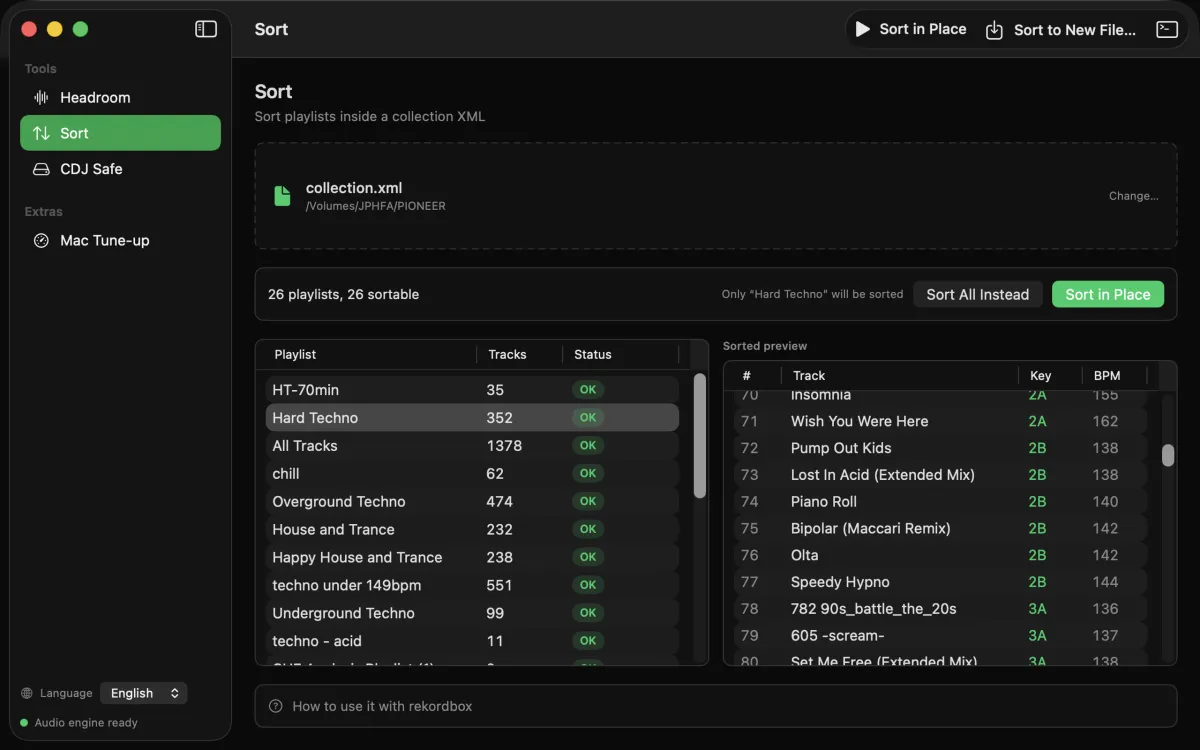
How to sort a rekordbox playlist by key and BPM
- Export your collection as XML
File → Export Collection in xml format. Always save to the same path, for example ~/Music/rekordbox/collection.xml. - Run Sort
In the Mac app, the Sort page sorts every playlist in place; to see one playlist's new order before anything is written, take it through the Playlist steps. On the command line, baken rbsort collection.xml sorts every playlist in place. - Point Imported Library at that file, once
Preferences → Advanced → Database → rekordbox xml → Imported Library, and select the same file. This is a one-time setup. - Restart rekordbox
The rekordbox xml tree in the left sidebar becomes a sorted mirror of your Playlists. - Export to USB
Drag a playlist from the rekordbox xml tree into your Playlists, switch to EXPORT mode, right-click → Export Playlist. The CDJ plays it in that order.
Don't see it? The sorted playlists live only in the rekordbox xml tree, not in your main Playlists. Switch sidebar trees.
Sort rules
- Primary: Alphanumeric key ascending,
1A → 1B → 2A → 2B → … → 12A → 12B - Secondary: BPM ascending within each key group
- Alphanumeric (
8A) and Classic (Am,F#m,Db) keys sort alike, as rekordbox exports them: the command line since baken 4.2.0, Bake'n Deck for Mac since 1.2.0 - Tracks with no key sort after all known keys; BPM 0 sorts last within a key group
- The exported XML is sorted in place. Only the order of the track references changes; names, folders and every other byte are preserved, so re-running is a no-op
- Your rekordbox library itself is never touched; the sorted playlists appear in the separate
rekordbox xmltree
Frequently asked questions
Can rekordbox sort by key and BPM at the same time?
Not in one step. rekordbox and the players sort one column at a time, and rekordbox's Renumber Track Order stores only that one-column order in the playlist. Sort by key and the BPMs inside each key stay in the order the tracks were added to the playlist. Getting both means writing a key then BPM order into the playlist itself: by hand that is two sorts and two renumbers per playlist, and Bake'n Deck's Sort does it for every playlist at once.
Why are the BPMs scattered after I sort by key on the CDJ?
Because sorting on the player is a view. It never changes the order stored in the playlist, and the stored order is what the CDJ reads.
Does this modify my rekordbox library?
No. Your library is never touched. Only the track order inside the exported XML changes, and the sorted playlists appear in the separate rekordbox xml tree. Names and folder structure stay as they were.
Do cues and beatgrids survive?
Yes. Sort changes the order of the track references and nothing else. The audio files are not touched at all.
Is it free?
The baken CLI is free and MIT licensed for macOS, Windows and Linux. Bake'n Deck for Mac is a one-time purchase on the Mac App Store, with no subscription.
Get Sort
Bake'n Deck for Mac is on the Mac App Store. It shows the resulting order before anything is written and offers a re-sort whenever rekordbox exports the XML again. On macOS 27 it also compares rekordbox's BPM and key with what macOS hears and marks the disagreements (how, with the numbers). The baken CLI is free and MIT licensed.