
headroom is now Bake'n Deck 3.0 — the baken binary replaces headroom. Old install channels under the headroom name (brew / winget / cargo / AUR) no longer receive updates. Details →
GitHub
v3.0.1

What you prep in Rekordbox
is what plays on the deck.

Rekordbox's Auto Gain doesn't survive USB export, Rekordbox has never offered compound Key+BPM playlist sort (Serato had it for years — but never exported to CDJs), and pre-NXS2 CDJs won't reliably play anything but MP3. Bake'n Deck bakes all three into the files themselves.

Three gaps in the Rekordbox → CDJ workflow

Rekordbox prep doesn't fully reach the booth. Three software-only conveniences get left behind on the way to the CDJ.

Gap 1 — Auto Gain doesn't survive USB export

Rekordbox's Auto Gain feature analyzes your tracks and calculates gain adjustments to normalize loudness. It works great with controllers.

But when you export to USB for CDJs, Auto Gain values are ignored.

  • Quiet tracks from smaller labels need +3~4dB trim boost
  • Old releases and CD rips are often much quieter
  • Constant trim adjustments mid-set break your flow
  • Risk of clipping if you forget to reset trim
Auto Gain on USB export
Rekordbox analyzes track → Auto Gain: +2.5dB
Export to USB
CDJ ignores Auto Gain value
Track plays too quiet → Manual trim adjustment

Gap 2 — Compound Key+BPM sort never existed

Harmonic mixing wants a playlist sorted by Camelot Key, then by BPM within each key group. Rekordbox's UI has never offered compound sort: its Sort by Key view is single-column, so BPMs scatter inside each key group.

Serato has had Shift-click multi-column sort for years — but Serato can't export to USB for standalone CDJs. The compound sort never reaches the booth.

  • Manual tag-hunting between tracks mid-set
  • Bucket playlists by key, then re-sort by BPM by hand
  • Even Rekordbox's Sort by Key view scatters BPM inside each key group
  • CDJs play in playlist order, so any in-software sort is invisible on the deck
Why the sort never reaches CDJ
Rekordbox: Sort by Key — BPM scattered
Rekordbox: Sort by BPM — Key scattered
No compound sort in Rekordbox UI
Even if there was — CDJs play in playlist order, not sort order

Gap 3 — Older CDJs won't play your formats

Rekordbox exports FLAC, ALAC, AIFF, WAV, and AAC to USB without complaint. But pre-NXS2 players (CDJ-2000NXS, CDJ-2000, CDJ-900NXS, CDJ-850, …) only play MP3 reliably.

FLAC needs NXS2 (2016+) hardware, and the other formats fail on specific firmwares — sometimes mid-set, after loading fine at first.

  • A lossless-first library silently assumes modern decks
  • "Format not supported" only shows up in the booth
  • Manual pre-gig transcoding loses your cues and beatgrids
  • Generic batch converters don't know Rekordbox tag conventions
Lossless library on an older CDJ
Rekordbox: FLAC playlist, cues set, grid analyzed
Export to USB — no warning
Booth deck is a CDJ-2000NXS → "format not supported"
Track unavailable mid-set

The Solution: Bake It In

Gain, playlist order, or format compatibility — Bake'n Deck takes the prep work Rekordbox does in software and writes it into something the CDJ will actually read: the audio file itself (for gain), the playlist itself (for Key+BPM order), or a CDJ-safe MP3 copy of the whole playlist (for older decks).

Bake'n Deck Workflow
baken headroom analyzes track → Headroom: +2.5dB
Gain baked into audio file
rbsort bakes Key+BPM into playlist
cdjsafe bakes the playlist into CDJ-safe MP3s (older decks)
Export to USB (Rekordbox metadata preserved)
CDJ plays at correct level, in harmonic order

Same prep work — but where the CDJ can see it

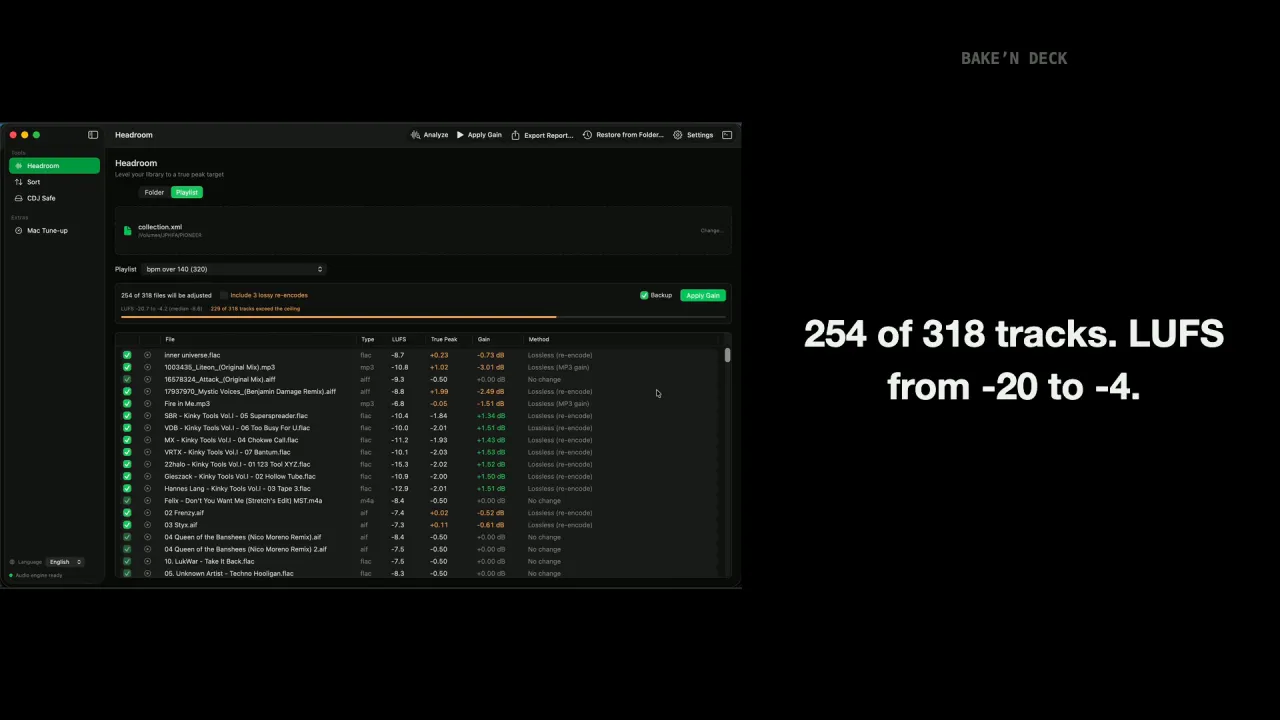
The Loudness Normalizer (baken headroom) measures True Peak and bakes safe gain directly into your audio files — the same analysis Rekordbox Auto Gain does, but with a permanent result. rbsort takes a Rekordbox playlist and bakes Camelot Key + BPM order into the playlist itself.

  • Analyzes LUFS and True Peak (same as Rekordbox)
  • Supports FLAC, AIFF, WAV, MP3, and AAC/M4A
  • Applies gain without limiting or compression
  • Preserves all Rekordbox metadata (cue points, hot cues, beat grids)
  • rbsort rewrites playlist order in collection.xml — originals stay intact
  • cdjsafe converts a whole playlist to CDJ-safe MP3s — cues and beatgrids carried over
Terminal — v3.0.1
$ baken headroom

╭─────────────────────────────────────╮
baken v3.0.1
│ Bake'n Deck — CDJ Prep Toolkit │
╰─────────────────────────────────────╯

Found 28 audio files
Analyzed 28 files

3 lossless files (ffmpeg, precise gain)
Filename LUFS True Peak Target Gain
track01.flac -13.3 -3.2 dBTP -0.5 dBTP +2.7 dB

2 MP3 files (native lossless, 1.5 dB steps, requires TP ≤ -2.0 dBTP)
Filename LUFS True Peak Target Gain
track04.mp3 -14.0 -5.5 dBTP -0.5 dBTP +4.5 dB

2 AAC/M4A files (native lossless, 1.5 dB steps, requires TP ≤ -2.0 dBTP)
Filename LUFS True Peak Target Gain
track08.m4a -13.0 -4.0 dBTP -0.5 dBTP +3.0 dB

2 MP3 files (re-encode required for precise gain)
Filename LUFS True Peak Target Gain
track06.mp3 -12.0 -1.5 dBTP -0.5 dBTP +1.0 dB

1 AAC/M4A files (re-encode required)
Filename LUFS True Peak Target Gain
track10.m4a -12.5 -1.8 dBTP -0.5 dBTP +1.3 dB

? Apply lossless gain adjustment to 3 lossless + 2 MP3 + 2 AAC/M4A (lossless gain) files? [y/N] y

2 MP3 + 1 AAC/M4A files have headroom but require re-encoding.
• Re-encoding causes minor quality loss (inaudible at 256kbps+)
• Original bitrate will be preserved
? Also process these files with re-encoding? [y/N] y

Done! 10 files processed.
• 3 lossless files (ffmpeg)
• 2 MP3 files (native, lossless)
• 2 AAC/M4A files (native, lossless)
• 2 MP3 files (re-encoded)
• 1 AAC/M4A files (re-encoded)

Loudness Normalizer

Pillar one: bake gain into your audio files before USB export. Bake'n Deck picks the optimal method per format and headroom amount, preserving original bitrate and Rekordbox metadata.

Smart format processing

FLAC / AIFF / WAV
Lossless ffmpeg volume filter Floating-point arbitrary precision
Target: −0.5 dBTP ceiling
MP3 / AAC / M4A
Headroom ≥ 1.5 dB?
Yes
Lossless Built-in mp3rgain Truly lossless global_gain
1.5 dB step increments
No
Opt-in Re-encode Arbitrary precision gain
Preserves original bitrate

Files already at optimal level are automatically skipped.

Why Re-encoding is Safe at High Bitrates

A common concern is quality loss when re-encoding MP3/AAC. However, for gain adjustment only at high bitrates (≥256 kbps), the degradation is completely inaudible.

  • Quantization noise below -90dB — far below audible threshold
  • ABX tests confirm — listeners cannot distinguish 320kbps→320kbps re-encodes
  • Waveform preserved — gain is simple multiplication, no compression or EQ applied
  • Club environment — any theoretical difference is masked by ambient noise and PA characteristics
  • High-quality encoders — Bake'n Deck uses libmp3lame/libfdk_aac with best quality settings

Supported formats

All the formats Rekordbox DJs actually use.

Format Method Precision Quality
FLAC ffmpeg volume filter Arbitrary Lossless
AIFF ffmpeg volume filter Arbitrary Lossless
WAV ffmpeg volume filter Arbitrary Lossless
MP3 mp3rgain (built-in) 1.5dB steps Lossless
MP3 ffmpeg re-encode (opt-in) Arbitrary Inaudible at ≥256kbps
AAC/M4A mp3rgain (built-in) 1.5dB steps Lossless
AAC/M4A ffmpeg re-encode (opt-in) Arbitrary Inaudible at ≥256kbps

Playlist Sort by Key + BPM — All the Way to CDJ

Pillar two: bake Camelot Key + BPM order into the playlist itself. Feed rbsort your exported collection.xml and get back a Sorted (Key+BPM)/ folder containing each playlist re-sorted 1A (lowest BPM) → 12B (highest BPM) for harmonic mixing. Run with --playlist to target one, or omit it to sort every TrackID-referenced playlist in one pass. Export the result to USB and CDJs read it in that exact order — the harmonic flow reaches the deck, not just the laptop.

Why this matters for CDJ users

Bake'n Deck exists because Rekordbox's Auto Gain doesn't follow your tracks onto the CDJ — the analyzer fixes that by baking gain into the audio files, so the loudness work survives USB export.

rbsort is the same idea applied to playlist order. Rekordbox can't multi-column sort, and even if it could, CDJs play tracks in playlist order, not by software sort. rbsort bakes the Key+BPM order into the playlist itself, so the harmonic-mix prep you do at home shows up on the deck without any reordering at the gig.

Workflow

  1. Set key display to Alphanumeric (1A..12B notation) in Rekordbox: Preferences → View → Key display format → Alphanumeric
  2. Export your collection: File → Export Collection in xml format
  3. Run baken rbsort against the exported XML (omit --playlist to sort every TrackID-referenced playlist at once, or pass --playlist "Name" to target one)
  4. Point Rekordbox at the output: Preferences → Advanced → Database → rekordbox xml → Imported Library → select the output file, then restart Rekordbox (the XML is only read on startup)
  5. Open the rekordbox xml tree in the left sidebar — it's a separate tree from your main library, accessed via the sidebar icon column on the far left. The sorted results live in a new folder at rekordbox xml → Playlists → Sorted (Key+BPM)/, each playlist named after its source
  6. Verify the sort by clicking any playlist inside Sorted (Key+BPM)/: tracks run 1A (lowest BPM) → 1B → 2A → … → 12B (highest BPM)
  7. Drag the playlists you want out of Sorted (Key+BPM)/ into your main Playlists to use them in your sets — your originals are untouched
  8. Export to USB for CDJ: switch Rekordbox to EXPORT mode (top-left dropdown), plug in your USB / SD, then right-click the playlist → Export Playlist. The CDJ reads the playlist in the order it's stored — Key+BPM order travels to the deck

Don't see it? The sorted results live only inside the rekordbox xml → Sorted (Key+BPM)/ folder, not in your main Playlists. If you only see the originals, switch sidebar trees.

Terminal — rbsort
$ baken rbsort --xml ~/Music/rekordbox/collection.xml
# no --playlist → sort every TrackID-referenced playlist in the XML

Sorted 12 playlists (1480 total tracks) into 'Sorted (Key+BPM)/' → ~/Music/rekordbox/collection-out.xml
Import via Rekordbox: Preferences > Advanced > Database > rekordbox xml
Restart Rekordbox, then look under the rekordbox xml sidebar tree

$ baken rbsort \
--xml ~/Music/rekordbox/collection.xml \
--playlist "MyPlaylist"
# or target a single playlist; output goes into the same Sorted (Key+BPM)/ folder

Sorted 124 tracks into 'Sorted (Key+BPM)/MyPlaylist' → ~/Music/rekordbox/collection-out.xml

Sort Rules

  • Primary: Camelot Key ascending — 1A → 1B → 2A → 2B → … → 12A → 12B
  • Secondary: BPM ascending within each key group
  • Tracks with no Camelot key sort after all known keys
  • Tracks with BPM 0 / unanalyzed sort last within their key group
  • Your original collection.xml is never modified — output goes to a separate file with a new Sorted (Key+BPM)/ folder appended
  • Originals stay in place; the sorted copies live inside Sorted (Key+BPM)/ and reuse the source playlist names (same pattern as the analyzer's backup/ directory)

Single-column sort vs. multi-column sort

Rekordbox and the CDJ-3000 / XDJ-1000MK2 can sort a list by Key or BPM — but never both at once. Given the same input playlist, the three sort modes produce different orderings:

Sort mode Key order BPM within key group
Sort by Key (single column) ✓ aligned ✗ playlist registration order
Sort by BPM (single column) ✗ scattered across the wheel ✓ aligned (but Key grouping is gone)
rbsort (multi-column: Key → BPM) ✓ aligned ✓ ascending

See docs/rbsort-sort-comparison.md for a 6-track walk-through showing the actual track ordering each mode produces.

CDJ-safe MP3 Prep — the Emergency Backup USB

Pillar three (new in v3.0.0): bake the whole playlist into a format every deck can read. baken cdjsafe converts every track in a target playlist to 320 kbps CBR MP3 @ 44.1 kHz (ID3v2.3 tags, artwork kept) and emits an updated XML where each converted track inherits the source's beatgrid and hot/memory cues verbatim — import, one right-click, export to USB. No re-analysis, no re-setting cues.

Why this matters for CDJ users

Pre-NXS2 CDJs only play MP3 reliably — and Rekordbox will happily export a FLAC playlist to USB without warning you. The failure shows up in the booth, sometimes mid-set.

cdjsafe is the same design thesis as the other two subcommands, applied to format compatibility: instead of hoping the booth has NXS2+ decks, bake a CDJ-safe copy of the playlist and carry it as your emergency-backup stick. Sources already at exactly 320 kbps CBR @ 44.1 kHz are copied byte-identically (zero generation loss, LAME header untouched), and lossy→lossy re-encodes are flagged in the run report so you can refresh those from lossless masters later.

Workflow

  1. Export your collection: File → Export Collection in xml format
  2. Run baken cdjsafe with --xml, --playlist, and --out-dir — the MP3s land in the output directory, the updated XML next to the input
  3. Point Rekordbox at the output: Preferences → Advanced → Database → rekordbox xml → Imported Library, then restart Rekordbox
  4. Import to Collection: open the rekordbox xml sidebar tree → CDJ-safe (MP3)/, right-click the imported tracks → Import to Collection. Beatgrids and cues carry over — nothing to re-analyze
  5. Export the playlist to USB in EXPORT mode, as usual. This stick plays on any CDJ in the booth
Terminal — cdjsafe
$ baken cdjsafe \
--xml ~/Music/rekordbox/collection.xml \
--playlist "Sets/Friday" \
--out-dir ~/Music/cdjsafe-friday

▸ Converting 24 tracks from 'Sets/Friday' → ~/Music/cdjsafe-friday

Done! 24 CDJ-safe tracks written.
• 18 re-encoded from lossless sources
• 4 re-encoded lossy→lossy (generation loss)
• 2 copied (already 320 kbps CBR MP3 @ 44.1 kHz)

Lossy→lossy re-encodes — refresh these from lossless masters before the next gig:
• Old White Label Rip
• Bandcamp 192k Download

XML written: collection-out.xml (playlist 'CDJ-safe (MP3)/Friday')
Rekordbox: Preferences > Advanced > Database > rekordbox xml → load the XML, restart
Right-click the imported tracks → Import to Collection — cues carried over

Design notes

  • Every track is normalized to the same profile — skipping "good enough" sources would leave holes in the backup USB, which defeats the point
  • Output profile is locked (320 kbps CBR / 44.1 kHz / ID3v2.3): the only combination that plays reliably across the whole CDJ fleet, and CBR sidesteps Rekordbox's VBR cue-offset problem
  • New XML entries get fresh TrackIDs and a [cdjsafe] comment marker — your original tracks and playlists are never modified
  • A valid Xing/LAME header is written, so Rekordbox compensates the encoder delay and cues stay sample-aligned
  • If any track fails to convert, no XML is written — all-or-nothing by design
  • Requires ffmpeg with libmp3lame (Homebrew/winget builds qualify); soxr resampling used when available

Built for Rekordbox DJs

What the three pillars give you, beyond the headline.

📦

Single Binary

mp3rgain is built-in as of v1.3.0. Only ffmpeg required as external dependency, and rbsort doesn't even need that. Simple installation.

🎵

AAC/M4A Lossless

Native lossless gain for AAC/M4A via mp3rgain. Re-encode fallback for precise gain.

🎚️

Auto Gain Simulation

Uses the same LUFS/True Peak analysis as Rekordbox. Calculates maximum safe gain to hit the optimal ceiling.

💾

Rekordbox Compatible

Files are modified in-place. All your cue points, hot cues, beat grids, and tags remain intact.

🔒

Non-Destructive

Original files are backed up before processing. rbsort writes to a separate XML file — your collection.xml is never modified.

📊

Uniform True Peak Ceiling

Default -0.5 dBTP for every file — the most aggressive value AES TD1008 §7B sanctions for any limiter in the chain. Tunable via --tp-target; legacy bitrate split available via --tp-split-bitrate.

🎹

Compound Key+BPM Sort, on CDJ

The rbsort subcommand bakes Camelot Key (1A→12B) then BPM ascending into the playlist itself — the compound sort Rekordbox doesn't expose and Serato can't get to USB. Export to USB and CDJs play it in that exact order. Originals untouched.

🛟

CDJ-safe MP3 Prep

The cdjsafe subcommand converts a whole playlist to 320 kbps CBR MP3 @ 44.1 kHz for pre-NXS2 CDJs — beatgrids and hot/memory cues carried over verbatim, already-compliant MP3s copied byte-identically. Your emergency-backup USB plays on any deck.

🤖

Interactive & Scriptable

Bare baken headroom runs a guided two-stage wizard. Pass paths, globs, or flags (--lossless, --reencode, --backup, --report, --analyze-only) for non-interactive use in pipelines and CI.

Why Bake'n Deck?

The free, open-source DJ loudness normalizer — with features paid tools don't offer.

Feature baken Paid Alternatives
Price Free & Open Source (MIT) €15+
macOS Windows only
Linux
AIFF Support Lossless
AAC/M4A Support Lossless gain
Lossless MP3 Gain global_gain mod Unknown
True Peak Ceiling AES TD1008 §7B uniform -0.5 dBTP, fully tunable Basic
Rekordbox Metadata Preserved Unknown
Automatic Backup
Sort Playlist by Key + BPM rbsort (v2.0.0+)
GUI CLI only

Bake'n Deck is a CLI toolkit designed for DJs who want maximum control and transparency over their loudness normalization workflow.

Installation

Requires ffmpeg. Package managers install it automatically.

macOS (Homebrew)

brew install M-Igashi/tap/baken

Windows (winget)

winget install M-Igashi.baken

Arch Linux (AUR)

yay -S baken-bin

Cargo / Pre-built Binaries

cargo install baken

ffmpeg must be installed separately. Pre-built binaries on GitHub Releases.

On the deck, just play.

Trim-riding and tag-hunting belong in prep, not in the mix. Bake'n Deck moves both off the deck and into your files.